

Last Updated on November 8, 2026 by Team Digital Web Verse
If you are running a production WordPress environment, your database is likely slowly suffocating itself. In enterprise MSSQL or C# application environments, we strictly manage data schemas and index fragmentation. WordPress, by design, does the exact opposite. Over time, it hoards orphaned metadata, expired transients, and redundant post revisions, leading to severe database bloat.
Most users search for an advanced database cleaner WordPress plugin, click “clean all,” and hope their site doesn’t break. As a System Architect, I can tell you that approach is a gamble. This guide will walk you through exactly how to diagnose a bloated database, execute a deep audit, and safely resolve the structural issues without causing catastrophic data loss.
What Actually Causes Database Bloat?
Database bloat occurs when your application retains historical, temporary, or orphaned data that is no longer required for active page rendering. In WordPress, this primarily happens across three areas:
- Orphaned Post Meta: When posts or products are deleted, poorly coded plugins often leave the associated metadata behind
wp_postmeta. - Expired Transients: Temporary cached data that fails to clear upon expiration automatically.
- Spam and Revisions: Thousands of spam comments and auto-saved post revisions that exponentially inflate the size of
wp_posts.
When these tables grow too large, every SELECT query takes longer to execute, spiking your server’s CPU usage and destroying your Time To First Byte (TTFB). To fix this, you need to implement a reliable database cleaning strategy.

How to Clean Up wp_options Table (The Right Way)
The biggest bottleneck in 90% of WordPress installations is the wp_options table. Learning how to clean up wp_options table data is mandatory for site performance.


WordPress loads every row in the wp_options table where the autoload column is set to yes on every single page load. If a deleted plugin left behind 5MB of autoloaded configuration data, your server is loading that 5MB into memory every time a user clicks a link on your site. Over time, this bloat accumulates and significantly slows down database response times. Fortunately, identifying and removing these orphaned entries can instantly restore your site’s speed. In this guide, we will show you how to safely clean up your database.
To perform a WordPress clean wp_options table operation correctly, follow these essential steps to safely remove orphaned data and optimize database performance:
- Identify Autoloaded Size: Run a SQL query via phpMyAdmin to check the total size of your autoloaded data:
SELECT SUM(LENGTH(option_value)) FROM wp_options WHERE autoload = 'yes';(Ideally, this should be kept well under 1MB). - Locate the Culprits: Sort the
wp_optionstable by data length. You will often find orphaned options from plugins you uninstalled months ago. - Purge Safely: Never delete core WordPress options. Only target keys explicitly tied to removed themes or plugins.
Executing a WooCommerce Database Bloat Audit
If you run an e-commerce store, the problem is magnified tenfold. A WooCommerce database bloat audit is critical because WooCommerce generates massive amounts of transactional data. Orders, customer sessions, and transient data pile up quickly behind the scenes. Left unchecked, this accumulation of digital debris will eventually drag your site speed to a crawl.
- WooCommerce Sessions: The
wp_woocommerce_sessionstable can grow to millions of rows if server cron jobs fail to clear expired customer sessions. - Action Scheduler Logs: Background tasks in WooCommerce log every action. Over time, the
wp_actionscheduler_logstable can inflate to gigabytes in size. - Order Metadata: Each order creates dozens of rows in the meta tables.
To audit this, you must analyze your table sizes and truncate expired session data and old logs without touching active order data or customer profiles. Regular maintenance prevents database bloat and ensures optimal site performance over time.
The Solution: A Purpose-Built WordPress Database Cleaner
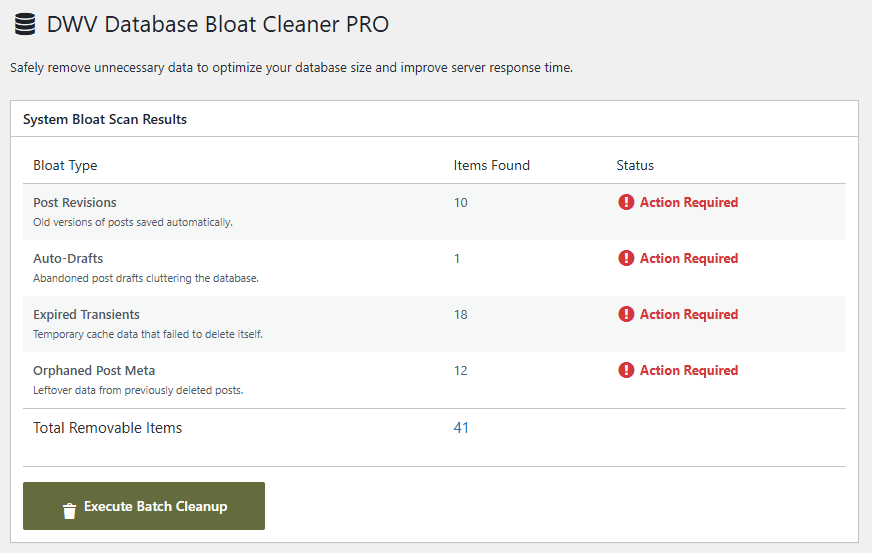
Manually writing SQL queries to clean these tables is risky and time-consuming. That is why I built the DWV Database Bloat Cleaner.
Unlike generic plugins built by hobbyists, this tool was engineered with enterprise database architecture principles. It acts as an advanced database cleaner WordPress plugin, specifically targeting the deep-rooted structural issues in wp_options and WooCommerce tables that other plugins completely miss.
The DWV plugin allows you to:
- Safely identify and purge orphaned metadata without breaking table relations.
- Clean up the
wp_optionstable by instantly identifying heavy autoloaded rows. - Execute targeted cleanups specifically designed for heavy WooCommerce environments.
Stop Guessing with Generic Cleaners
You cannot fix a structural database issue by clicking a generic “clean all” button. You need a tool built on enterprise architecture principles. Our software ensures your site remains fast and reliable.
The DWV Database Bloat Cleaner is designed specifically to target heavy autoloaded wp_options data and orphaned WooCommerce logs without risking your core metadata.
