
A Faster WordPress Site Starts with a Clean Database
Digital Web Verse Database Bloat Cleaner safely removes thousands of orphaned revisions, auto-drafts, and expired transients with a single click. Reclaim server space and keep your backend running smoothly without risking your live site. Optimize your database tables today for lightning-fast performance.
The Silent Killer of WordPress Performance
The Problem
Every time you save a draft, update a post, or delete a plugin, WordPress leaves behind digital garbage. Over time, orphaned metadata, expired transients, and hundreds of old post revisions bloat your SQL tables. This invisible clutter chokes your server, increases backup sizes, and silently slows down your site’s backend and frontend response times.
The Solution
DWV Database Bloat Cleaner acts as a precision scalpel for your database. Unlike bulky optimization suites that bog down your site with unnecessary scripts, this lightweight utility runs strictly on the backend. It safely targets only known junk data, letting you run a deep clean in seconds without risking live content.
Everything You Need to Keep Your Database Lean
Choose the Right Plan for Your Site
Free
Essential cleanup for standard WordPress sites.
- Manual Revisions & Draft Cleanup
- Expired Transients Sweep
- Dry-Run Preview Dashboard
- Community Forum Support
PRO
Advanced automation and deep cleaning for serious publishers.
- Everything in Free, plus:
- Automated Scheduled Cleanups
- Deep Orphaned Meta Deletion
- Multisite Network Support
- Premium Email Support
Frequently Asked Questions
Question: Is it safe to use on a live, active website?
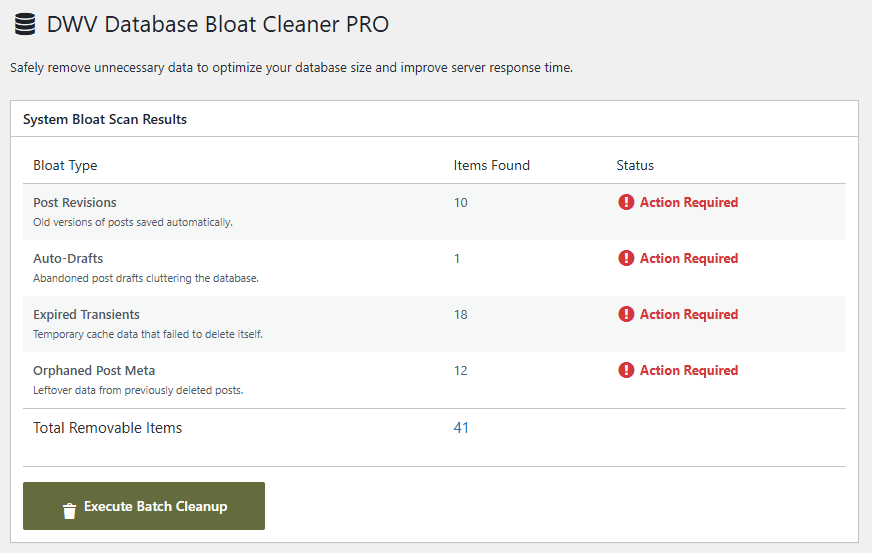
Answer: Yes. DWV Database Bloat Cleaner uses strict, read-only SQL queries to identify junk data. It will never touch your core WordPress tables, live posts, or active plugin settings. Plus, the built-in Dry-Run dashboard lets you see exactly what will be deleted before you execute the sweep.
Question: Do I still need to back up my database before cleaning?
Answer: While our plugin is designed for maximum safety, it is always a WordPress best practice to run a quick database backup (using UpdraftPlus or your host’s backup tool) before running any optimization or cleanup routine.
Question: Will this plugin slow down my site while it runs?
Answer: No. Unlike other suites that load bulky scripts on your frontend, our cleaner is a strictly backend utility. It uses secure AJAX execution to clean your tables in the background without interrupting your live traffic.
Question: What happens if I cancel my PRO subscription?
Answer: You will keep all the PRO features you paid for, and the plugin will continue to work perfectly. However, you will no longer receive premium email support or access to future automated maintenance updates after your year expires.